
Support
Get help with your Pinlights products or reach out to our team.
Stern Shaker Connections
Installation instructions for the Pinlights Shaker interface cable on Stern SPIKE-2 games.
Before you begin — power the game OFF.
Do not make any connections with the game powered on.
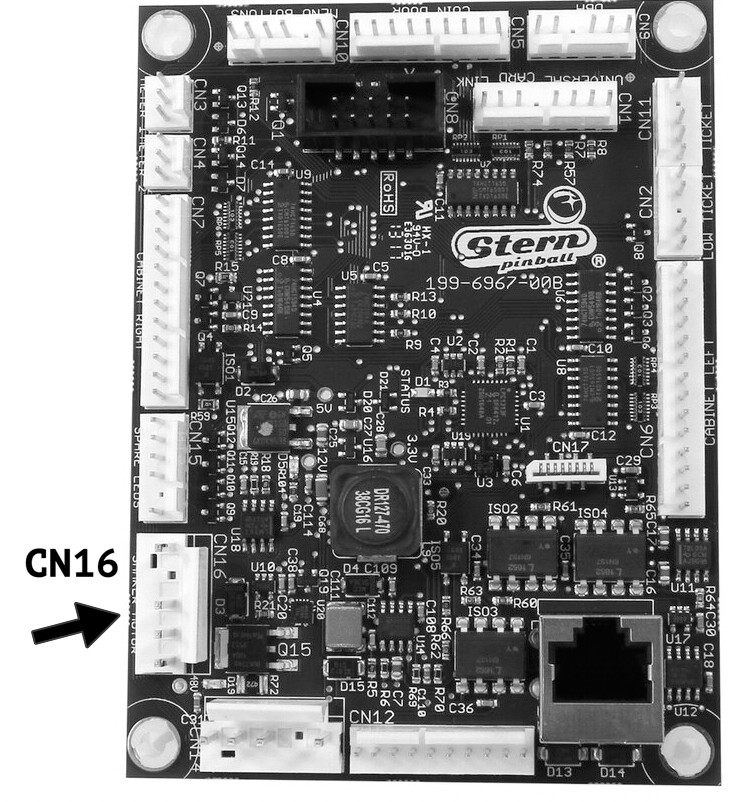
Remove the Shaker Motor Cable at CN16
With the game powered OFF, remove your shaker motor cable at CN16. These are usually blue and red wires.
Plug in the Pinlights Shaker Interface Cable
Plug the female end of the included Pinlights Shaker interface cable into CN16.
Reconnect the Shaker Motor
Plug the shaker motor into the Z connector end of the Pinlights Shaker interface cable.
Connect to the Pinlights Flasher Harness
Plug the black 2-pin JST connector into your Pinlights flasher cable harness.
Double check your connections.
Make sure the 48V line at CN1 (gray/black cables) still has the capacitor connected, if one was present originally.
Questions? Contact [email protected].